
The Future of Networking: How SONiC’s Open Architecture Drives Innovation and Efficiency
SONiC (Software for Open Networking in the Cloud) emerged from Microsoft’s innovation hub in 2016, designed to transform…
Read More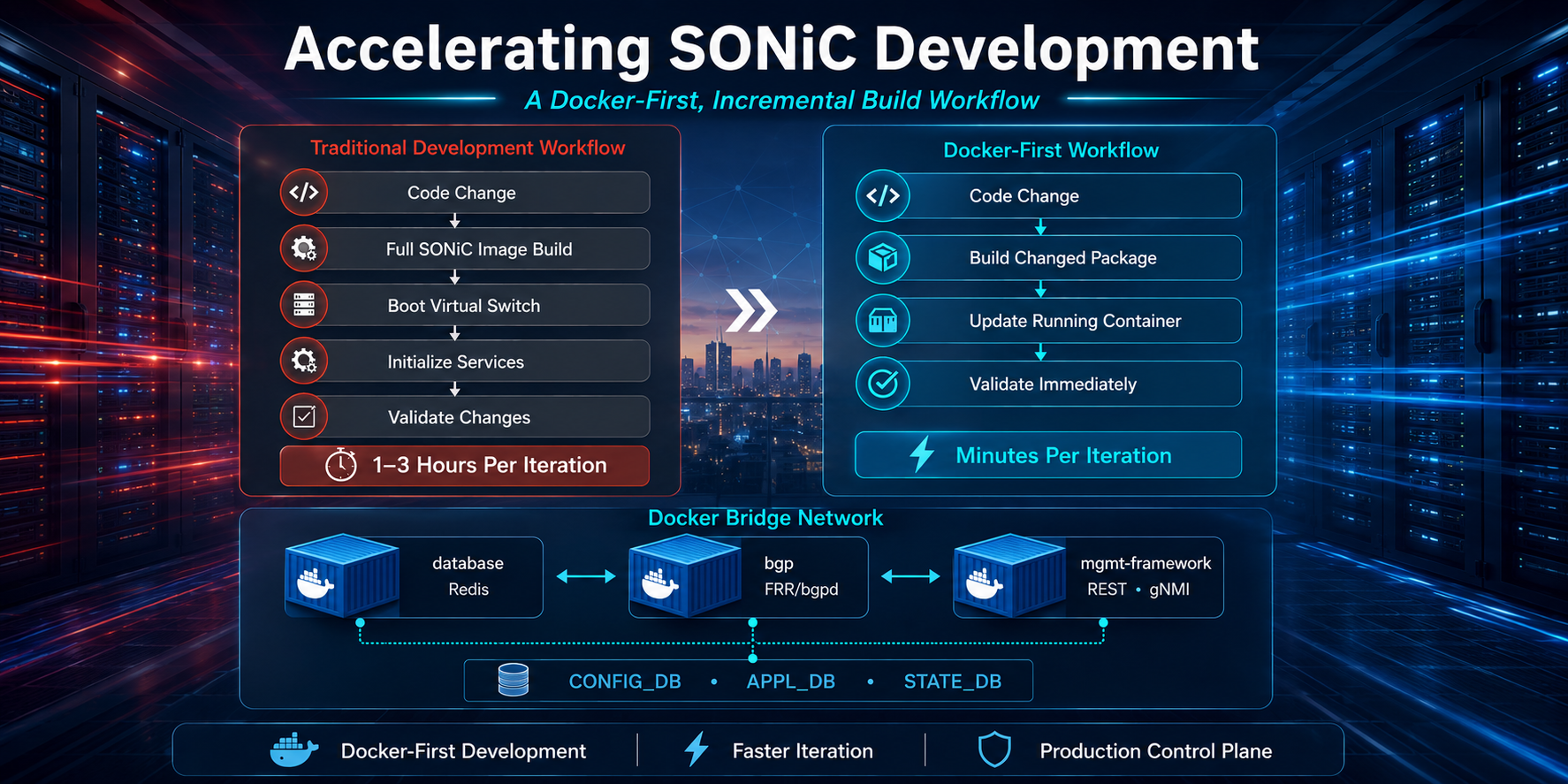
Developing new features for SONiC should be about solving networking problems, not waiting for builds to finish. In many SONiC development environments, even a small...
Developing new features for SONiC should be about solving networking problems, not waiting for builds to finish.
In many SONiC development environments, even a small control-plane change can trigger a full image rebuild, followed by booting a virtual switch and waiting for every service to initialize before validation begins. While this workflow ensures end-to-end consistency, it can significantly slow feature development, bug fixes, and iterative testing.
Fortunately, SONiC’s modular, containerized architecture enables a more efficient development model. By rebuilding only the components that change and validating them within a running SONiC environment, engineering teams can dramatically reduce iteration times without sacrificing production-aligned testing.
One of SONiC’s defining characteristics is its microservices-based architecture. Rather than running all networking functions inside a single operating system process, SONiC separates services into independent Docker containers.
Each container is responsible for a specific function within the network operating system. Examples include routing, switch state management, telemetry, synchronization, and management services. These containers communicate through shared databases such as Redis and standardized interfaces, allowing individual services to be updated or restarted independently while maintaining overall system functionality.
This modular architecture provides more than deployment flexibility-it also enables targeted development workflows. Since services are isolated, engineers can modify a single container without rebuilding the complete SONiC image, making incremental development both practical and efficient.
Instead of rebuilding the entire SONiC image after every change, a Docker-first workflow focuses on running only the services required for the feature being developed. By deploying only the containers involved in a specific feature and updating only the modified package, developers can iterate much faster while preserving the same control-plane interactions used in production.
Suppose you’re developing a BGP feature that also needs to be configurable through a REST API. Instead of launching a complete SONiC instance, you only need the containers directly involved in that workflow.
A minimal development topology consists of three containers:
That’s all that’s needed.
There’s no need to start syncd, pmon, SNMP, telemetry, LLDP, teamd, or even a virtual switch. By deploying only the services your feature interacts with, development environments become significantly lighter and startup times are reduced to seconds.
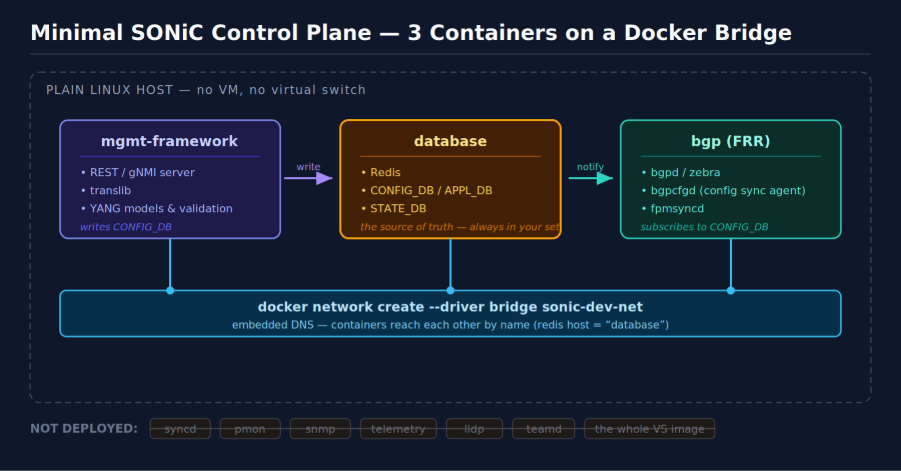
Once the required containers are identified, they can be connected using a Docker bridge network.
Docker’s built-in DNS automatically resolves container names, allowing every service to connect to Redis simply by referencing the hostname database.
This recreates the same production control-plane workflow:
Although only three containers are running, developers are exercising the exact configuration path used in a production SONiC deployment. The complete control-plane interaction is reproduced on a standard Linux development machine without requiring a full SONiC image or virtual switch.
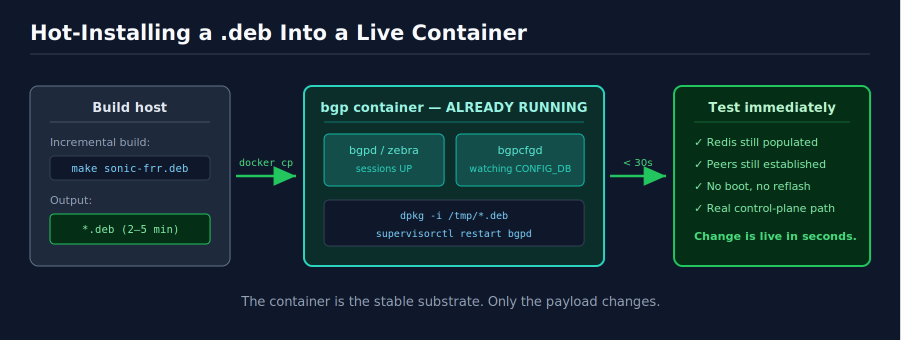
Rather than rebuilding the complete SONiC image, developers compile only the Debian package corresponding to the service they modified, for example:
Targeted package builds typically complete in minutes instead of hours while producing the same Debian artifacts that will eventually be included in the production SONiC image.
This dramatically shortens the edit-build-test cycle during active feature development.
After the package is built, it can be copied directly into the running container, installed, and the affected service restarted.
Because the container is already running, Redis is already populated, and BGP sessions are already established, developers can validate their changes almost immediately.
Instead of rebuilding an image, rebooting a virtual switch, and waiting for every SONiC service to initialize, new functionality becomes available within seconds. This significantly accelerates debugging, feature development, and iterative testing while maintaining realistic control-plane behavior.
As SONiC deployments become more sophisticated, development efficiency becomes increasingly important.
Modern data center networking projects commonly involve:
Rebuilding an entire network operating system for every incremental change becomes increasingly inefficient as project complexity grows.
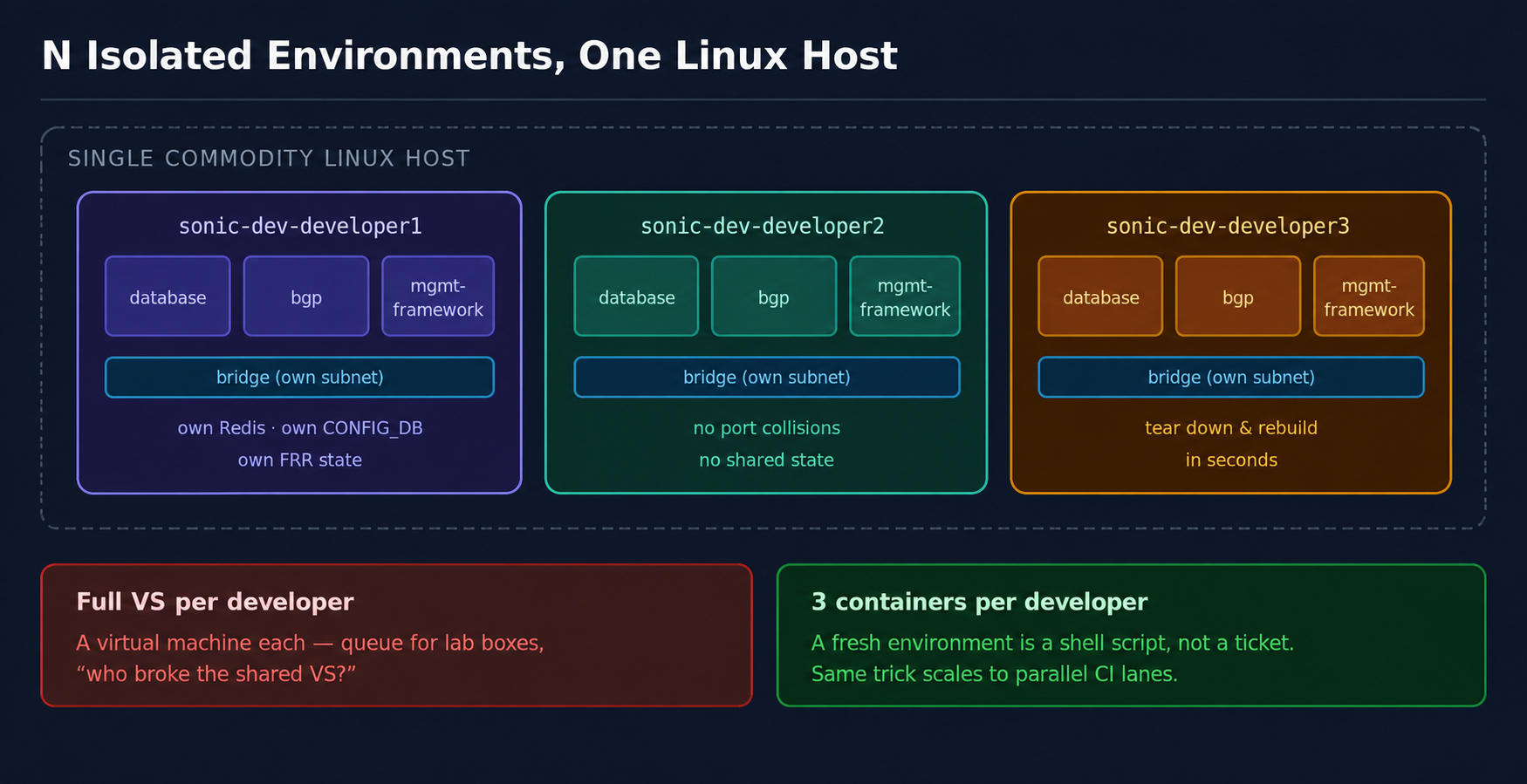
A Docker-first workflow allows multiple engineering teams to work independently on different services while preserving integration with the complete control plane. Developers can spin up only the containers required for their feature, rebuild only the affected package, and validate changes against real production workflows. The result is faster development cycles, improved CI/CD efficiency, and quicker validation without compromising production accuracy.
Incremental development should complement, rather than replace full system validation.
Complete SONiC image builds remain essential before production releases to verify package dependencies, image composition, service initialization, upgrade behavior, and overall system stability.
A Docker-first workflow is most effective during active feature development, debugging, regression testing, and rapid iteration. Final release validation should always be performed using complete SONiC images to ensure production readiness.
Combining both approaches allows engineering teams to maximize productivity during development while maintaining confidence in release quality.
At PalC Networks, we work extensively on SONiC customization, control-plane enhancements, and platform integrations for modern data center networks. Through these engagements, we’ve adopted a Docker-first incremental development workflow that enables faster feature iteration while preserving the same production control-plane interactions used in deployed SONiC environments.
While complete system validation remains essential before release, this incremental workflow allows day-to-day engineering to move much faster by focusing only on the components that change.
SONiC (Software for Open Networking in the Cloud) emerged from Microsoft’s innovation hub in 2016, designed to transform…
Read More
This document provides an overview of integrating Telegraf, InfluxDB, and Grafana to monitor SONiC (Software for Open Networking…
Read More
Building a data center is not what it used to be. Servers, VMs, networking fabrics-these are no longer…
Read MoreNext steps
Talk to an Infrastructure Expert to discuss how PalC can help you build production-grade, open networking solutions.

Connect with our experts to discuss your network modernization, SONiC deployment, or AI infrastructure needs.
Tell us about your infrastructure challenges and we'll connect you with our experts.